The planner's question
Answering it means reading. The engineering recommendation list (the mapping table) has hundreds of items across electrical, mechanical and visual inspections. Contracts arrive as PDFs with tables that differ from supplier to supplier, and a single cross mark decides whether an item belongs to a minor, medium or major outage. The two documents rarely use the same words for the same task.
At Bool we built a Mendix application for an industrial client in the German energy sector that turns this reading into a guided, auditable workflow, using the client's own internal GPT-class model. The MVP took three weeks and a team of two. This is how it works, what the first real contracts taught us, and why Mendix was the right place to put the AI.
From AI experiment to Mendix application
The client had already proven the idea before we started. One well-written prompt in a chat assistant, a mapping table and a synonym list built from seven contracts agreed with the planners more than 95% of the time on a sample. What a chat window cannot do is run the same check every week for every contract, keep the evidence, let a planner correct the result and remember who changed what.
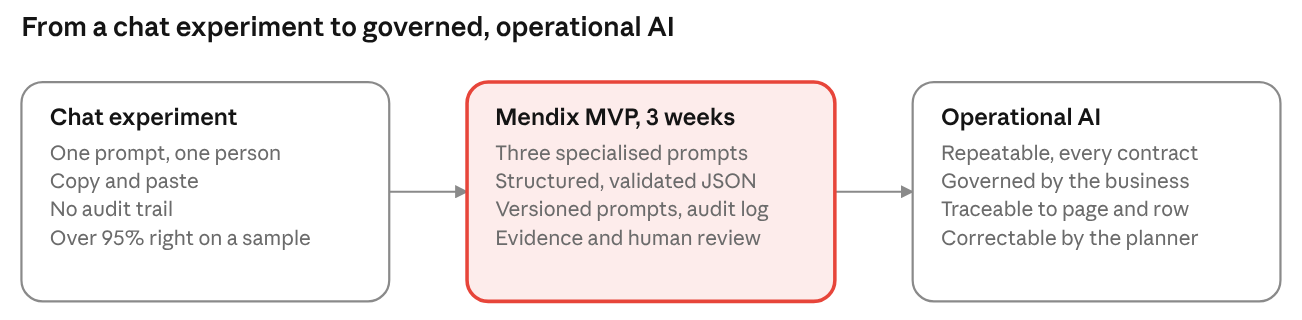
That gap is what the Mendix application closes. The document goes in, Mendix orchestrates the prompts, the client's LLM answers, Mendix validates and stores each answer with its evidence, a planner reviews it, and every step is logged. In one line: the LLM proposes, Mendix governs, the planner decides.
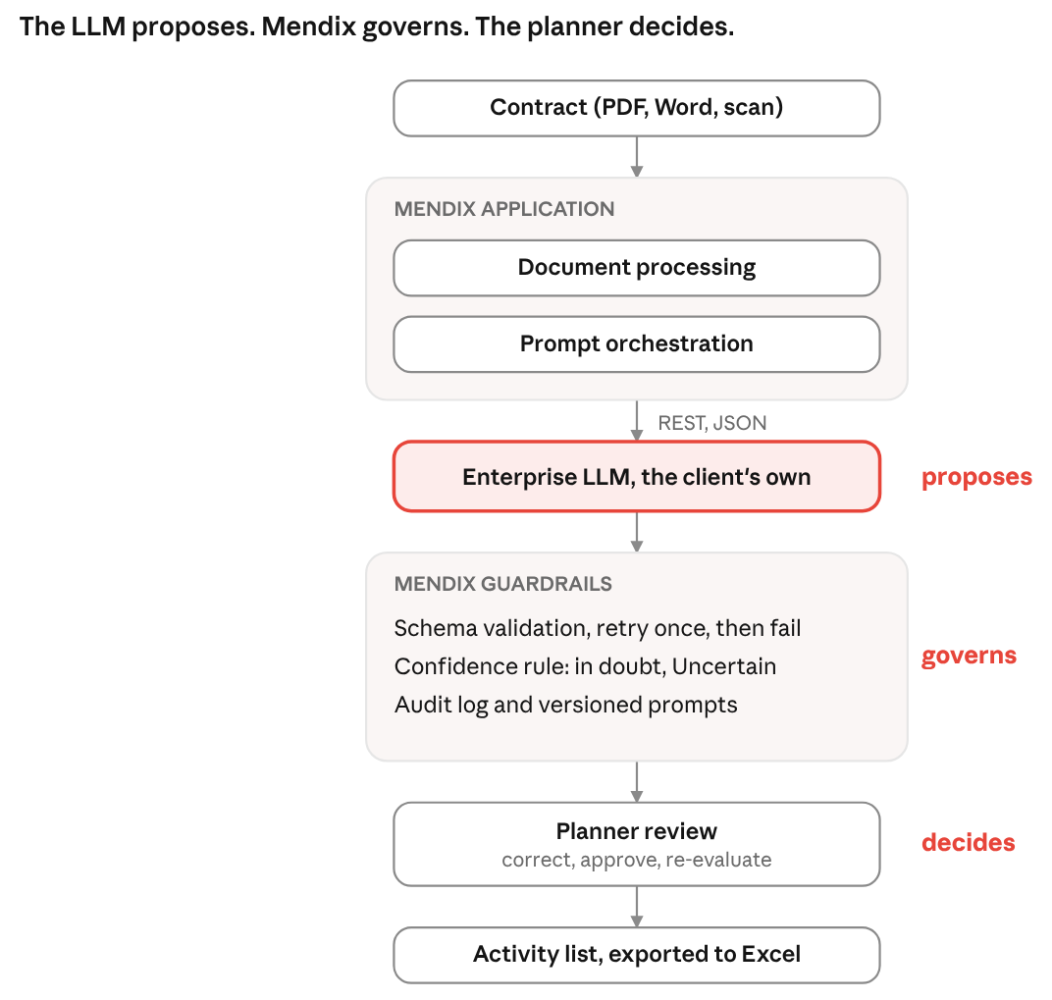
The LLM is used only where rule-based code struggled: reading tables with no fixed layout, and judging whether two differently worded items mean the same thing. Everything else, from document storage and security to the review screens and the Excel export, comes from native Mendix capabilities.
Three prompts, one chain
Our first version was one big prompt: here is the contract, tell me what matches. It worked on tidy documents and failed on real ones. Flattened tables lost their columns, and a cross in the Medium column looked exactly like a cross in Major.
So the job became a chain of three prompts, each with one task and a strict JSON output that the next step can trust.
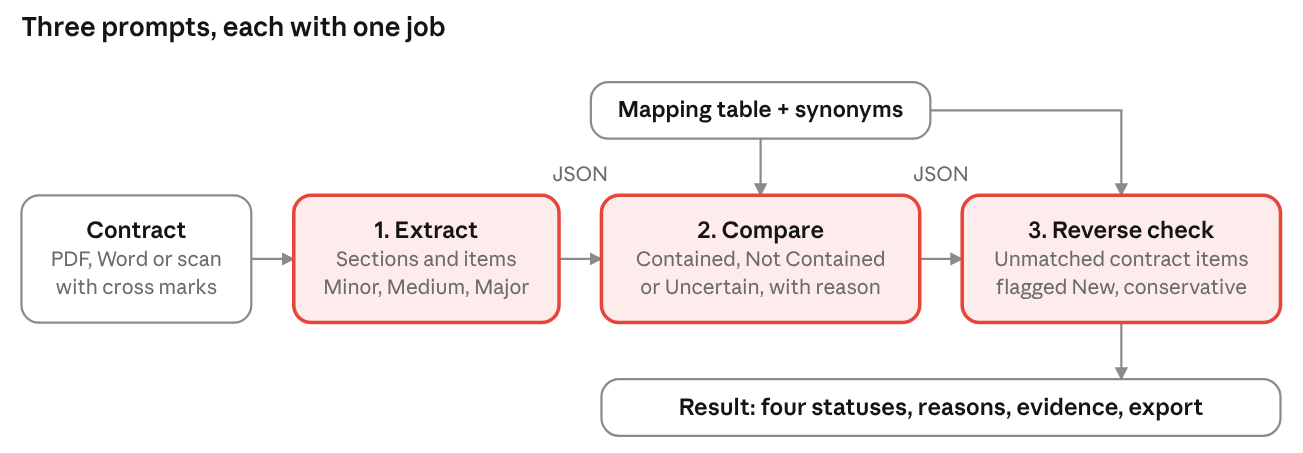
Extract reads the contract (PDF, Word, or a scan via OCR) and returns sections, items and three yes or no flags for Minor, Medium and Major, with the page and row each item came from. Compare takes every mapping-table entry and answers Contained, Not Contained or Uncertain, with its reason. Reverse check looks at the contract items that matched nothing and flags them New, conservatively.
The part that changed most was how cross marks are read. The rule that survived five real contracts says: an x, a tick or a bullet is a mark; the page legend wins when there is one; an empty cell only counts as "not marked" if another cell in the same row is marked; never guess from the item name. That last rule came from a real contract in week three and took fifteen minutes to add.
Making AI safe enough for real work
Every engineering recommendation ends with one of four answers.
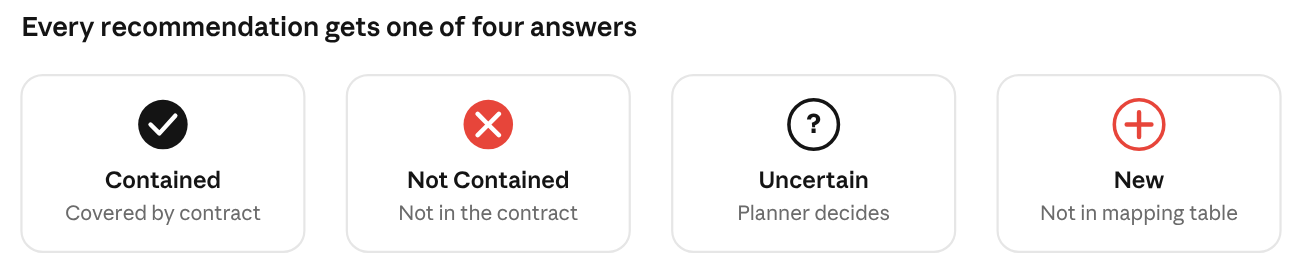
One rule shaped the prompts more than any other, and the client stated it in one sentence: the AI does not need to know everything, but it must reliably say when it does not know. A confident wrong answer is the most critical failure mode. An Uncertain costs the planner thirty seconds. A wrong Contained hides a gap in the contract.
Three mechanisms enforce it. Every answer must fit a JSON schema or it is rejected. Every answer carries its evidence: the mapping entry, the synonym that justified the match, the page and row in the contract. And a confidence threshold, kept in a Mendix microflow rather than in the prompt, turns any low-confidence Contained or Not Contained into Uncertain.
The reason and the evidence sit next to every row in the app. They did more for trust than the confidence number, which we ended up hiding from everyday users. A planner who can see the page, the row and the synonym behind a decision accepts it in seconds, and spots a wrong one just as fast.
Prompts as data, not code
Each new contract taught us something about the prompts. If every lesson had meant a code change, a build and a deployment, the three-week MVP would have spent half its time waiting. So prompts are configuration: they live in the Mendix domain model, a power user edits them in a back-office page, and every save is a new version.
- Prompt template: One per job: extract, compare, reverse check. Points at its active version
- Prompt version: The full text, the expected output schema, a change note, who changed it and when
- LLM call log: For every call: the prompt version, the document, the request, the response, the duration
One microflow makes every call. It loads the active prompt version, fills in the inputs, calls the client's LLM endpoint, validates the answer against the schema, retries once with the error attached if needed, and logs the call whether it worked or not. Because every log record points at the prompt version that produced it, "why did this item become Uncertain last Tuesday?" is a question we answer by opening a record.
Human-in-the-loop by design
Automation nobody can correct is automation nobody trusts. The review screens answer one question: what is left for me to decide?
Uncertain items are the planner's to-do list. One click assigns one to a mapping entry and it becomes Contained, with an audit note of who decided, when, and what the model had proposed. New items are accepted or rejected and dragged into place. Contained and Not Contained stay read-only unless the planner asks for a re-evaluation.
- Bulk select or deselect cross marks: One scanned contract came back with no cross marks detected. The planner fixes the whole document in one reversible action instead of 150 clicks
- Filters by status, outage type and section: Work through one subsection at a time, or only the Uncertain items
- Completion indicator on the contract header: Done means zero Uncertain items. The counts stay visible, so a manager knows when the list is ready
The output is the activity list: everything Contained plus every accepted New item, in the planner's order, exported to Excel for the downstream planning tools. The export warns when many items are still Uncertain, so an unfinished review cannot quietly become a plan.
Benchmark: what changed
In January 2026 the client ran five real contracts from different sites through the MVP and checked every line by hand. These numbers are real; the contract names are anonymised. Finding items was never the problem: in the four digital contracts, extraction found 97.6% to 100% of the items. The fifth was a scan on which no cross marks were detected at all, which is where the bulk correction feature came from.
The interesting number is how the AI behaved when it was wrong.
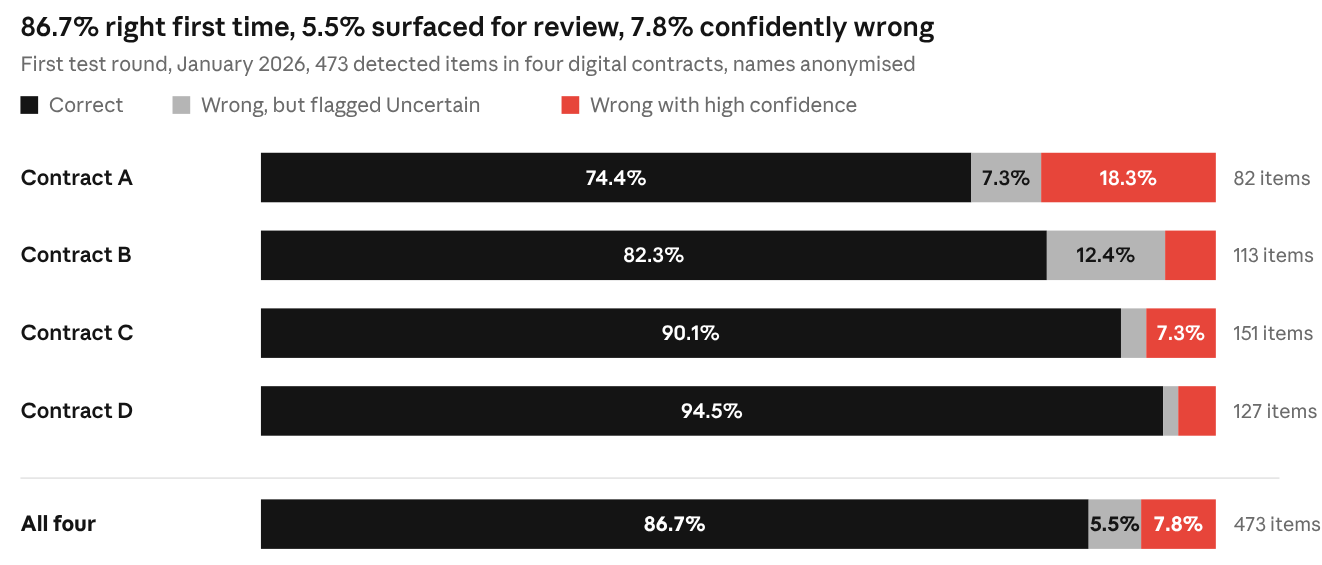
Across 473 detected items, 86.7% were correct on the first pass. Another 5.5% were wrong but deliberately surfaced for human review rather than silently accepted, which is the human-in-the-loop design doing its job. And 7.8% were wrong with high confidence: the failure mode the system is built to avoid. That 7.8%, concentrated in one contract, set the agenda for the second phase.
- Confident wrong answers: First round (measured): 7.8% of items (4% to 18% per contract). Phase 2 target: under 2%
- Items lost at page breaks: First round (measured): 5 of 478. Phase 2 target: 0
- Long contracts (over 90 items): First round (measured): quality dropped after item 90. Phase 2 target: stable, through chunking
- Scanned contracts with no marks: First round (measured): returned empty outage columns. Phase 2 target: flagged for manual check
The targets are targets, not results. We will publish the measured values once phase 2 is tested. On time, our estimate from the test documents is that a planner spends about an hour and a half on a 150-item contract with the application, most of it on Uncertain and New items, against most of a day by hand. The three prompts themselves run in about four minutes, in the background.
What failed and what we learned
Five real contracts taught us more than fifty slides of planning would have. The short list:
- Items at a page break went missing: Extraction overlaps page boundaries and re-reads the last table row of each page
- Quality dropped suddenly after about 90 items: Long contracts are chunked by section, processed and merged, and every run is monitored
- The model was sometimes confidently wrong: A confidence guardrail in a microflow: below the threshold the answer is Uncertain, full stop
- A scanned contract had no detectable cross marks: Bulk select and deselect of cross marks, reversible
- A failed run left half-written data behind: Transactional imports: a failed run rolls back, logs an explicit error and tells the user
Behind the list sits one lesson. The model was the smallest part of the problem. The client's internal LLM did what a GPT-class model does well; the engineering went into decomposition, schemas, logging and the review experience.
Why Mendix worked for this use case
Mendix gave us the parts that are not specific to this client: document storage, the domain model, role-based security, the REST integration to the LLM gateway, background task handling, Excel export and a drag-and-drop review screen. The team of two spent its three weeks on what was specific: the prompt chain, the guardrails and the planner's workflow.

Mendix also gave us the governance layer. Prompts are versioned data with a change log. Every AI call is logged with its inputs and outputs. Business rules such as the confidence threshold live in microflows the client can read and change. When the client asked for owner-controlled prompt configuration in the first feedback round, it was already there. That is the difference between an application that calls a model and an application that governs one.
Conclusion: human teams, AI amplified
Does the contract cover it? For our client, every answer to that question now comes with a page, a row and a reason, and the planner's time goes to the items that need a human. AI does the reading and the matching. People make the decisions.
This is how we approach AI at Bool. Start with a concrete task that eats expert hours. Use the client's own, governed LLM where one exists. Wrap it in a Mendix application that makes every output reviewable, correctable and exportable, and build the feedback loop in from day one. Speed without structure is risk. Structure is what turns a promising AI pilot into a tool people rely on.